

Hyperautomation projects rarely fail because the tools are weak. They fail because teams automate processes nobody designed around the user. The six building blocks and seven techniques of the Service Automation Framework give your team a structured way to get ready first.
Gartner describes hyperautomation as a business-driven, disciplined approach to rapidly identify, vet and automate as many business and IT processes as possible, using a combination of technologies such as RPA, process management, low-code tools, machine learning and AI. In 2026 that mix increasingly includes AI agents that can plan and act on their own.
Most of the attention goes to the technology. The harder question is whether your team knows what to automate, for whom, and how to tell whether the result is better for the person on the other end. That is a service question, and it is exactly the question the DASCIN Service Automation Framework was built to answer.
This article shows how to use SAF as a preparation program. We walk through what each building block asks of your team, turn the seven SAF Techniques into practical team exercises, and finish with a role map, a quick readiness check and a 90 day plan.
The readiness gap behind hyperautomation
Investment is moving faster than organizational readiness. Independent research from the past year points to the same pattern: people feel ready, organizations do not, and projects stall in between.
40%+
of agentic AI projects will be canceled by the end of 2027, Gartner predicts, due to cost, unclear value or weak risk controls
Gartner, June 2025
27%
of leaders say their organization is ready for the shifts an agentic future requires, against 70% of people who feel personally ready
McKinsey, Feb to Apr 2026 survey
13%
of employees were accomplished in agentic AI skills before upskilling, the lowest of 14 capabilities measured
Workera, May 2026
43%
of leaders expect agentic AI to significantly disrupt their workforce in the next 12 to 18 months
Deloitte, August 2026
Gartner’s own advice is telling: pursue agentic AI only where it delivers clear value, and in many cases rethink the workflow from the ground up instead of bolting agents onto the old one. Rethinking a workflow around value for the user is service design work. Your team needs that skill before it needs another automation platform.
Process automation asks “how.” Service automation asks “for whom.”
Hyperautomation programs usually start from a process inventory: which steps are repetitive, rule based and high volume. SAF starts from the user and works inward. Both views are needed, but teams that only have the first one tend to automate the wrong things very efficiently.
SAF builds on the self-service practices of IT Service Management and treats every service as a process: a sequence of interactions between a provider and a user that can be broken into steps, scripted and automated. Ride hailing is the classic example. Searching, booking, paying and rating are all automated; only the ride itself still needs a person. The framework gives teams a uniform model, a common vocabulary and practical templates for doing the same with their own services.
Six building blocks, and what each asks of your team
SAF has six building blocks. The first three form the “heart” of a service and focus on design. The outer three form the “brain” and focus on delivery: they are the methods and processes that let a service interact with users without human intervention. The order is logical, but each block is equally important.
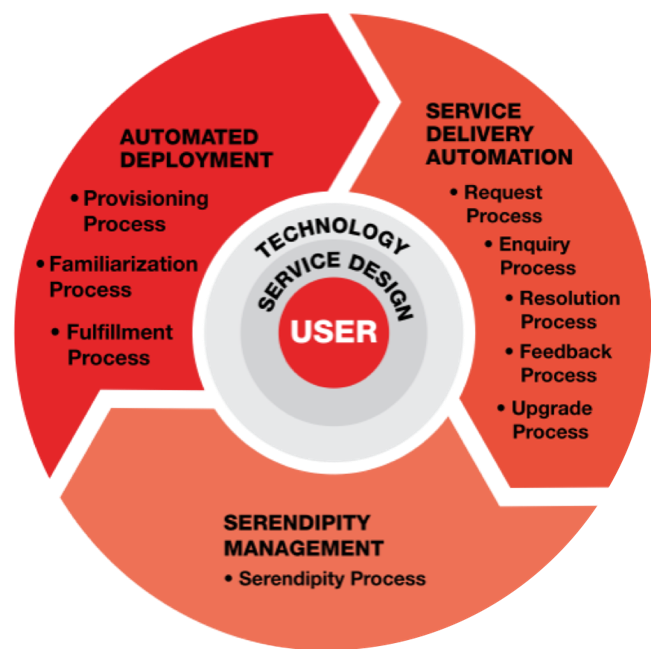
User
Defines the key characteristics of the groups of people a service provider aims to serve.
Hyperautomation readiness
Every automation candidate should name the user group it serves. If your backlog lists processes but not users, your team cannot judge whether an automated step improves or damages the experience.
Service Design
The business function that turns service concepts into an actual design, including support structures and digital interfaces.
Hyperautomation readiness
This is where you decide which steps should exist at all. Removing a step is cheaper than automating it, and agents perform best in bounded, well designed workflows.
Technology
Defines the setup and usability of the digital interfaces that connect service providers with their users.
Hyperautomation readiness
In SAF, technology means the interface the user touches, such as a self-service portal or app, not the automation stack behind it. Teams should be able to judge usability, not just integration.
Automated Deployment
The processes that let a user start using a service based on their own action.
Provisioning Familiarization Fulfillment
Hyperautomation readiness
Onboarding is often the first place automation goes wrong. A user who is provisioned instantly but never shown how to use the service generates more support tickets, not fewer.
Service Delivery Automation
The processes that let a user change or resolve any aspect of the service based on their own action.
Request Inquiry Resolution Upgrade Feedback
Hyperautomation readiness
These five processes are the natural home for RPA, AI and agents. Mapping them first tells your team where each technology fits and where a human handoff must stay.
Serendipity Management
The processes that plan a continuous approach to exceeding user expectations.
Hyperautomation readiness
Automation data shows what users do. Serendipity Management teaches teams to use it to surprise and retain users, which keeps hyperautomation focused on value instead of only on cost.
Turn the seven SAF Techniques into team exercises
SAF pairs its building blocks with seven Service Automation Framework Techniques (SAFTs), a step by step plan for adopting service automation. Run them in order on one real service. Each technique below includes a team exercise and the readiness signal that tells you it worked.
- 1
SAFT 1
Score it as a group, not alone
Understand the service perception of different users by grouping them and describing what shapes their expectations.
Team exercise: For one service, define three to five user groups with their characteristics. Include internal users if they are the ones requesting automated work.
Readiness signal: Every item on your automation backlog names the user group it serves. - 2
SAFT 2
Translate User Profiles into User Actions
Identify the needs and triggers that start a service request, with attention to the psychographic factors that shape the experience.
Team exercise: List the triggers that make each user group contact you. Rank them by volume and by frustration.
Readiness signal: Automation candidates are chosen by user trigger, not only by process step count. - 3
SAFT 3
Compose the Service Automation Blueprint
Use the SAF Canvas to compose a blueprint of the ideal user experience for one service and one user group.
Team exercise: Blueprint the front stage (what the user sees) and back stage (systems, bots, agents and people) of your chosen service. Mark every handoff.
Readiness signal: Your team can point to where an AI agent would act, what data it would need and where a person stays accountable. - 4
SAFT 4
Technology Interface Modeling
Design the self-service portal, the interface between user and service, based on industry good practice.
Team exercise: Test the current portal or app with five real users and record where they get stuck.
Readiness signal: Usability findings shape the automation scope before any build starts. - 5
SAFT 5
Implement Automated Deployment Processes
Apply the three Automated Deployment processes (Provisioning, Familiarization and Fulfillment) in your organization.
Team exercise: Automate onboarding for the blueprinted service, and design the familiarization step as carefully as provisioning.
Readiness signal: New users reach first value without contacting support. - 6
SAFT 6
Implement Service Delivery Automation Processes
Apply the five Service Delivery Automation processes (Request, Inquiry, Resolution, Upgrade and Feedback).
Team exercise: Assign each of the five processes the simplest technology that works: a form, a workflow, RPA, AI or an agent. Define monitoring and an escalation path for each.
Readiness signal: Every automated process has an owner, a measure and a way back to a human. - 7
SAFT 7
Surprise Your Users with Serendipity Management
Apply Serendipity Management to turn customers into long term fans.
Team exercise: Review feedback and usage data monthly and pick one improvement that users did not ask for but will notice.
Readiness signal: Your automation roadmap includes experience goals, not just efficiency targets.
Hyperautomation makes good services faster and bad services faster. SAF makes sure your team knows the difference before it scales.
Map the building blocks to your team
Hyperautomation is a team sport, and SAF gives each role a clear area of responsibility. Use this map to spot gaps: a block with no owner is a block that will be skipped.
| Role | Main blocks | Skill to build |
|---|---|---|
| Service owner | User, Serendipity | Defining user groups and owning experience measures across the service lifecycle |
| Service designer | Service Design, Technology | Blueprinting with the SAF Canvas and testing interfaces with real users |
| Process analyst | Service Design, Delivery | Translating user actions into process steps and finding steps to remove |
| Automation engineer | Deployment, Delivery | Choosing the right tool per process and building monitoring and escalation in |
| Data and AI specialist | Delivery, Serendipity | Feeding usage and feedback data back into design decisions |
| Automation CoE lead | All heart, all brain | Keeping the backlog tied to users and governing what gets scaled |
Quick readiness check
Tick each statement that is true for your team today. One statement per building block.
Your result
- 6 of 6. Your team has the foundations in place. Use SAFT7 to keep improving as you scale.
- 4 or 5. A solid base. Close the gaps before you scale automation further.
- 3 or fewer. Start with SAFT1 to SAFT3 on one service before adding more automation.
A 90 day preparation plan
Tick each statement that is true for your team today. One statement per building block.
Days 1 to 30
Learn and choose
- Train a core team on SAF fundamentals
- Pick one high volume service with visible user pain
- Run SAFT1 and SAFT2 with real user input
DAYS 31 TO 60
Design
- Compose the blueprint with SAFT3
- Test the interface with SAFT4
- Agree which steps to remove, simplify or automate
DAYS 61 TO 90
Automate and measure
- Implement SAFT5 and SAFT6 for the pilot service
- Set experience and efficiency measures
- Start the SAFT7 review cycle and document the template
Common questions
References
- Middelburg, J.W. Service Automation Framework: For the Design and Delivery of Automated Services. Van Haren Publishing. Summary at Service Automation Framework in 3 minutes
- Middelburg, J.W., Introduction to the Service Automation Framework (October 2019)
- APMG-International, DASCIN Service Automation Framework certifications
- Gartner, Information Technology Glossary: Hyperautomation
- Gartner, Gartner Predicts Over 40% of Agentic AI Projects Will Be Canceled by End of 2027 (June 25, 2025)
- McKinsey, AI Is Changing Work. Now It Has to Change the Organization (2026)
- Workera, via PR Newswire, Only 13% of Enterprise Employees Possess the Critical Skills to Understand and Work With AI Agents (May 20, 2026)
- Deloitte, via Yahoo Finance, AI Agents Are Only the Beginning: Deloitte Survey Examines the AI Readiness Gap (August 12, 2026)
Statistics come from the third-party sources listed above and describe the wider market. Predictions are labeled as such. This article is for general information.

